Author: qrmcclannan01@gmail.com

  • The Art of Selling Dog Top Hats (and Learning Shopify Along the Way)

    The Art of Selling Dog Top Hats (and Learning Shopify Along the Way)

    Find some cheap products, build a website, and sell them for more than you paid. Sounds simple, right? The idea of getting rich quickly through dropshipping has become a popular dream for many of my generation. With little to no upfront cost, all you need is a website and a basic understanding of how a supply chain works. It’s easy to see why so many are drawn to it as a quick way to make money.

    I’ve tried my hand at dropshipping a few times in the past. But considering I’m writing this blog post on a Saturday night from a bedroom barely big enough to qualify as a walk-in closet, and not behind the wheel of a Ferrari cruising through the streets of Ibiza, you can probably guess how that turned out.

    After finishing this week’s reading on e-commerce for my digital marketing class, I decided it was time to revisit the world of online business platforms. In particular Shopify, and see just how easy it really is to build a website, sell a product, and track key analytics. So, without further ado, let’s dive into the creation of a Shopify website from the ground up.

    Creating the site

    Article content
    Credit: Shopify

    Upon opening my soon to be million-dollar store, I am greeted by a neatly organized list laying out almost everything I need to launch it. From setting up payments and billing to adding products and designing my site. Shopify did a great job with this section (if you’re reading this, Shopify, go ahead and give yourself a pat on the back).

    To start, I began designing my store interface. I browse through the predesigned themes, looking for inspiration. After reflecting on why my previous shops didn’t quite take off, I’ve realized the issue wasn’t effort, it was the product. It just wasn’t essential enough. So, after years of market research, I’ve landed on the game-changing idea the world didn’t know it needed: high-end waterproof top hats for dogs.

    With that vision in mind, I navigate to the Themes section and choose “Vessel,” a sleek design that perfectly captures the elegant-yet-adventurous spirit of my brand. I click on “Add,” insert a few product image uploads, and just like that, my store begins to take shape.

    Article content
    Credit: Shopify (and my site)

    Adding Paw-Roducts

    The next step is to add a product, this is done by returning to the home page, selecting products, then clicking create new. You are then presented with this page:

    Article content

    Here you can add:

    • A product description
    • Price
    • Product category
    • Inventory
    • Identification (SKU, Barcode, etc)
    • Many more identifiers

    Once published, this becomes your live product page. It’s the place where visitors can explore your product, learn more about it, and add it to cart. This page often makes or breaks a sale, so invest in high-quality images and strong, engaging copy.

    Article content

    Measurement

    Now we have created a site and product listing, it’s time to shift our focus from building to measuring, understanding how your store is performing and managing the logistics that keep it running smoothly.

    Shopify offers several pages that make tracking your store’s progress easy and intuitive:

    • Marketing: Monitor campaigns, track attribution, and manage automations to see what’s driving traffic and sales.
    • Finance: View and edit payments, billing, and banking details
    • Analytics: View past and live reports of visitors, purchases, and other important factors to measure performance

    Now, let’s zoom into the analytics page and see what some of the sections mean.

    Article content
    Credit: Shopify

    Here, we can see key metrics such as conversion rate over time, customer location, returning customer rate, and many more. These analytics help turn raw data into potential insights. For example, if you notice a high number of website visits from a specific region, it might make sense to focus your marketing efforts there instead of areas with little to no traffic to create a stronger ROI on promotions.

    Best of all, this can all be done directly within Shopify! No third-party apps required. It’s so intuitive and easy to use that even a generation of teenagers could turn it into millions.

    Wrapping it up

    Overall, Shopify is an incredibly user-friendly platform for anyone looking to build, manage, and analyze an online store. From customizable themes to intuitive product listings, it provides all the core tools needed to create a fully functional e-commerce site with little technical experience required. Beyond design and setup, Shopify’s built-in analytics dashboard stands out by offering clear insights into traffic, conversions, and customer behavior without relying on third-party software.

    In short, Shopify makes the process of launching and managing an online business straightforward and extremely efficient, giving users everything they need to focus on what really matters: creating great products and turning data into smarter marketing decisions.

    If you found this helpful and want to learn more about digital marketing strategies, visit my site for more blog posts!

  • Measuring What Matters: The Power of CRO in Marketing

    Measuring What Matters: The Power of CRO in Marketing

    When you hear the word “optimization,” what do you think of? Possibly optimizing your sleep schedule so that you feel more rested, or adjusting your diet to lose weight. All these examples clearly have cause and effect making it simple to see results. But what about optimizing something more complex like product development or marketing campaigns? How do you measure improvement, when there are thousands of possible factors at play? Before you say that it’s impossible, let me show you some techniques used by marketers to achieve measurable results from Conversion Rate Optimization.

    Conversion Rate Optimization, What is it?

    Let’s review what Conversion Rate Optimization (CRO) is. As put simply by my Professor and Digital Marketing expert Mark Staton, “It’s all about having a goal in mind for your site or app, and then making it easier for people to achieve it.” For example, let’s say you are running an email campaign, with the goal of leading people to your site so they can see your product. CRO is making changes to that email so the process becomes smoother for the target audience. You change the size of the “shop now” button and notice that all the sudden clicks increase from 10% of users to 15% percent. This is an instance of CRO done right!

    Article content

    Measuring CRO with A/B Testing

    Now that we have a better understanding of what Conversion Rate Optimization is, let’s finally look at how we can measure it. While there are many techniques to do this, today we will be discussing A/B testing. This method compares two different versions of what you’re testing to see which one performs better. Revisiting our “shop now” button from earlier, to see if the change in button size really was the cause of the 5% conversion rate increase, lets design an A/B test.

    • Start with the original email (Email 1: The Control)
    • Make a copy and size up the button (Email 2: The Treatment)
    • You should have your original email (Email 1) as well as a copy with a sized up button (Email 2)
    • Randomly divide your mailing list so that half are presented email 1, while the other half are presented email 2

    After a week if email 2 is experiencing higher clicks on the shop now button, then congratulations, you have successfully optimized an aspect of your promotion! Now let’s take a look at this process through another lens. This time we are going to be testing the “add to cart” button on an e-commerce site.

    Each listing on this site has an “add to cart” button next to the item description. Although your boss insists it’s perfect the way it is, you think that adding another button next to the “add to cart” that says “buy now” will increase sales. After finally convincing them to let you test it, you set it up and it goes as follows:

    • You open the site (The Control)
    • You make a copy and add the “buy now” button (The Treatment)
    • You program the website so that half the visitors are presented with the original site (The Control) and the other half are presented with your updated site (The Treatment)
    • After a week of running the sites you see that your site (The Treatment) has a 7% increase in conversion rate than your bosses (the Control)

    You see this, calmly walk into their office, show the changes, they congratulate you, give you a raise, then you walk out of the building, get to the end of the parking lot, then pump your fist in the air like Bender at the end of the Breakfast Club.

    Article content
    You after getting a raise (Credit Universal Studios)

    As you can see, it’s a simple way to ensure that changes you make are actually having an effect, however there are some things you need to look out for to make sure it remains accurate. Let’s take a look at those now:

    • Time Period: Always perform A/B tests simultaneously, comparing Christmas sales to mid January sales will obviously give biased results.
    • Statistical significance: Try and keep changes between versions small. Ideally no more that 5% should be changed to best understand what is causing the differences.

    Not Just In The Text Books: A/B Testing in Practice

    By this point those of you just learning about A/B testing may be thinking “wow, that’s cool and all, but does anyone successful actually use this”, or “Is this just another dated strategy textbooks repeat year after year”. Instead of trying to convince you otherwise, let’s take a look at some large companies that utilize this very testing, all while experiencing strong performance.

    • Automakers like Toyota, Porsche, and many more use A/B testing for many aspects of their vehicles ranging from body design all the way to the internals of an engine (Rozange, 2025).
    • Using A/B testing, Amazon found that adding a “continue as guest” option at checkout increased sales by 45%, or $300 million in revenue in the first year (Fulton, 2025)

    Wrapping it up

    By now, we see the importance in Conversion Rate Optimization and it’s a measurable approach to understanding what really works and what doesn’t. Whether it’s testing the size of a button or changing the suspension in a car, CRO helps marketers form insights to turn small changes into meaningful results.

    If you enjoyed this post and want to learn more about marketing strategies and optimization techniques, check out my website for more blog posts!

  • From Crawling to Ranking: The Journey of SEO Success

    From Crawling to Ranking: The Journey of SEO Success

    Have you ever typed something into a search engine, clicked the first result, let’s say Nike, and then a few days later searched the same thing only to find Adidas at the top instead? “Weird”, you may think to yourself, then you click the first result without a second thought. Although seemingly trivial for the everyday shopper, to brands, that simple shift in ranking can mean millions in lost or gained sales. Behind every search result is an ongoing battle among digital marketers, all fighting for the legendary number one spot. Today, we will explore search engine optimization to gain a better understanding of what is really going on behind the screen, then what digital marketers do to improve their results!

    What is Search Engine Optimization and How Does It Work?

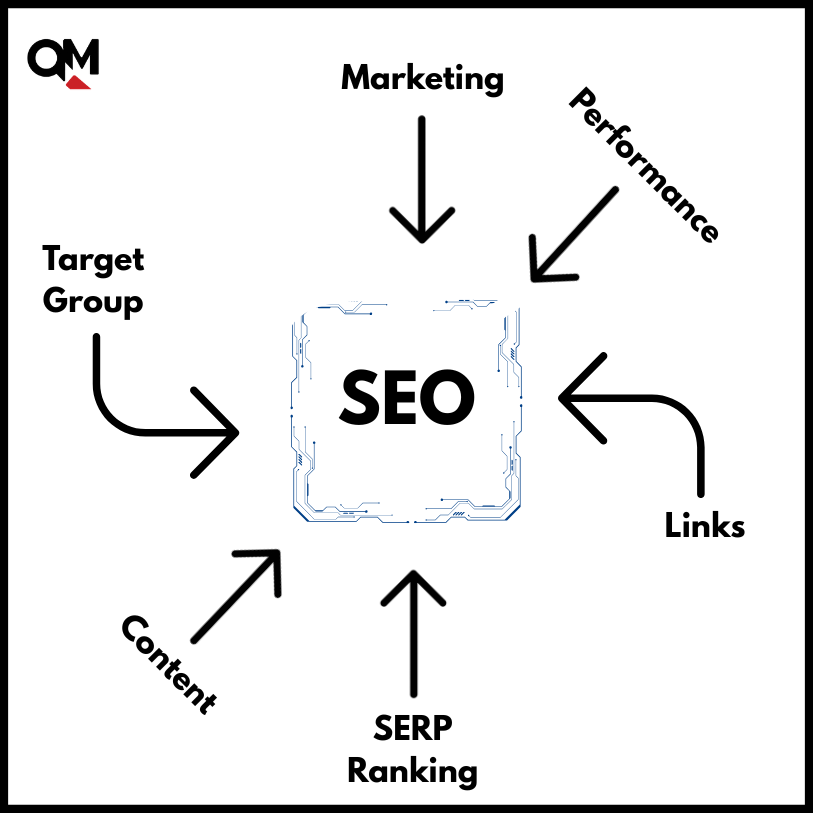
    Search engine optimization (SEO) is the process of optimizing a website to increase its ranking on search engine results pages (SERP). Now how is this done? Simple, through the process of crawling, indexing, and ranking. Although those may seem like three random and unrelated words, let me walk you through their process and how they determine what sites are shown and which ones are banished to later pages of the SERP.

    • Crawling: A search engine uses automated bots known as “crawlers” that scan web pages through links to best answer questions typed into the search bar. This process is happening constantly.
    • Indexing: Once crawlers have gathered enough data, they put it on a large list (database).
    • Ranking: This is the important part, the search engine uses algorithms, in order to determine the ranking of the websites listed in the database. Put simply the higher the rank, the closer to the first search result a site has.
    Article content

    Improve Your SEO!

    Now that I have filled your head with digital marketing jargon, it’s time to improve that ranking! This process is simple, you just have to EEAT! Now if the first thing that came to mind was to get some food, you are not entirely wrong. It is always best to be well fed when working, however the type of eat I am talking about is:

    • Experience
    • Expertise
    • Authoritativeness
    • Trustworthiness
    Article content
    Google EEAT (Credit Andava Digital)

    These are Google’s guidelines to garner a high ranking in the SERP, so let’s look at some strategies on how to properly EEAT.

    • On-Page SEO: This process requires some research, you must find what questions your customers are asking, then add them to headings and subheadings in your site. For example, Toyota’s 2026 Corolla Cross Hybrid page uses terms like Hybrid, MPG, and Audio Multimedia, all popular search terms among car shoppers. These elements show that Toyota has expertise in web design and user experience, as well as the trust and authority that come with having an established brand. Through a simple Google search we can see how Toyota uses On-Page SEO to rank first for hybrid SUVs.
    • Technical SEO: Ever clicked on a site that took forever to load, or tried using one on your phone that just didn’t work right? The digital marketer behind that site would benefit from Technical SEO. Notice how sites like Amazon load almost instantly, despite being full of images and listings. This is due to a team of website builders, optimizing code and compressing images which once again, is a key example of web design expertise, allowing the website to secure as many top results as possible.
    • Link Building SEO: When ranking, one of the biggest factors search engines consider are links. But before you add dozens of random links to your site in hopes to increase your ranking, it’s important to understand what links matter. Having links to and from relevant and reputable sites show search engines that your site has credibility. Think of it like the company you surround yourself with: would you rather be surrounded by troublemakers or by rule-followers and team players? The latter clearly makes you look more reliable.

    Wrapping It Up

    SEO isn’t just about algorithms and keywords, it’s about building trust, providing value, and creating a seamless experience for users. From optimizing your pages, improving technical performance, or earning quality links, each step strengthens your site’s credibility and possible ranking. Successful SEO isn’t a one-time change but an constant process of learning, adapting, and improving.

    If you found this helpful and want to learn more about digital marketing and SEO strategies, visit my site for more blog posts!

  • Driving Sales with Data: The Role of Web Analytics in Automotive Marketing

    Driving Sales with Data: The Role of Web Analytics in Automotive Marketing

    Last year around 16 million automobiles were sold in the US. To put it into perspective that’s enough cars to fill 21,333 Costco parking lots, sold in only one year. While many may hear this statistic and instantly dread their next trip to the grocery store, automakers view this as an opportunity. Using what I have learned from my recent Google Analytics Certification and Digital Marketing Class at Western Washington University, I’ll explore how web analytics help digital marketers understand the buyer journey and why these insights are key to the success of automotive companies.

    Shopping for cars has never been easier for consumers, in fact thanks to CARVANA, you can now purchase cars straight from a vending machine. As you can imagine, the process for researching new cars has shifted as well. A recent study from Forrester found that over 90% of buyers conduct extensive online research before purchasing a car. By understanding what features potential buyers are looking for, digital marketers can use web analytics to tailor both ads and products in order to increase sales! Google Analytics now gives digital marketers the ability to track the buyer journey more closely than ever. Let’s take a look at how this works:

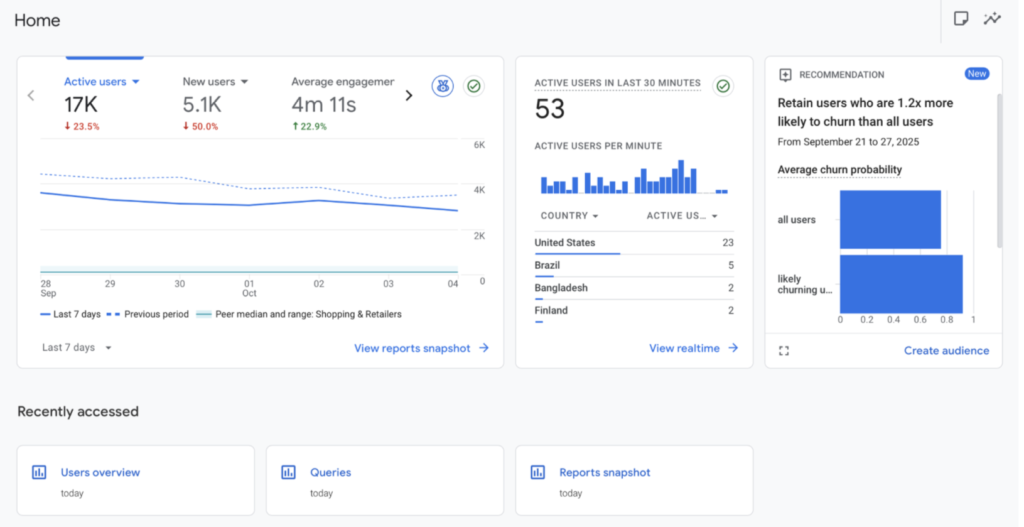
    • As soon as google analytics is opened, marketers can see how many potential car buyers have opened their site, from where they are viewing it, and even how likely they are to churn, which can help them form valuable insights on user acquisition.
    • Next let’s talk about user behavior. On the website, users interactions can be tracked through what is known as events. Our marketer notices significantly more events on the new hybrid model compared to the diesel. What could that show us? Possibly that customers are more interested in hybrid models or is it something else entirely?
    • Finally Conversion, the step every marketer wants to see. Using Google Analytics, we see what vehicles customers are buying, what trim levels they are adding, and most importantly, if they are repeat customers.

    Now that we got a good look at how Web Analytics programs such as Google Analytics can improve data collection, let’s shift gears (no pun intended) and look at what this means for automotive marketers.

    Using important metrics such as age, location, preferences, and many more collected from the user journey, Marketers can start to form insights and implement changes. Starting off they can be used to identify areas of growth. Using metrics such as page views, marketers can see what vehicle features are being viewed repeatedly and purchased vs which ones are neglected. This can be a great way to choose what feature to promote in their next ad campaign. Taking a step further by combining acquisition and conversion metrics, marketers can identify the gender, age, and location of customers buying specific cars, creating insights that help them fine-tune future targeting.

    We have seen how analytics can be used by the automotive industry to turn metrics into actionable insights. By utilizing this data, companies can reach the right customers, highlight the features that matter most, stay ahead of the competition, and sell more cars (filling more parking lots in the process).

    Interested in learning more about marketing strategies? Explore more of my blog posts on my website.